
Showing posts with label Blogging. Show all posts
Showing posts with label Blogging. Show all posts
Monday, May 2, 2011
1
Monday, May 2, 2011
Techopine™
Read more Here
Google Webmaster Guidelines (Nicefunspot )
Google Webmaster Guidelines - The number of search engines on internet is so numerous, thousands or perhaps tens of thousands. Does our blog need to optimize to all search engines? Even Kang Rohman himself focus on Google only as the biggest search engine.
Why should focus on one search engine only, and not to all search engines? Because each search engines has algorithm itself. Just wasting time to understand the character of each search engines because it need long time to do.
Why should pay attention on Google and not others such as Yahoo or Bing? This is only an option, if you want to focus on Yahoo optimization, go on, if you want to focus on Bing optimization, go ahead.
This page named Webmaster Guidelines.
To visit the Webmaster Guidelines, please go to:
http://www.google.com/support/webmasters/bin/answer.py?answer=35769
 There are lot of reliable informations which Google made itself, so read carefully all the guidelines they have wrote so you don’t get any trouble with Google in future.
Why should focus on one search engine only, and not to all search engines? Because each search engines has algorithm itself. Just wasting time to understand the character of each search engines because it need long time to do.
Why should pay attention on Google and not others such as Yahoo or Bing? This is only an option, if you want to focus on Yahoo optimization, go on, if you want to focus on Bing optimization, go ahead.
What Is Google Webmaster Guidelines
Google prefers users with rules of the game. In this case, Google has provided specifically page contains the direction for the webmaster, what to do and what not to do.This page named Webmaster Guidelines.
To visit the Webmaster Guidelines, please go to:
http://www.google.com/support/webmasters/bin/answer.py?answer=35769

0
Techopine™
Read more Here
SEO Basic Concept
We will be focused to study SEO (Search Engine Optimization) especially for bloggers/ BlogSpot users. I just want to skim someone’s opinions out there that blogger engine is not SEO friendly, it certainly not true because all get back to the engine users itself, whether to use blogger, Wordpress, Drupal, etc. If you didn’t understand how to apply various SEO techniques on the engine you used, it just a big zero.
Previously,We wants to instill the basic concepts of SEO that you should to remember, there are among others:
Maybe you have heard of SEO tips before in choosing a domain name , at least one keyword from your blog’s main topic, the post tittle should contain the target keyword, the first paragraph should contain the target keyword. Or maybe you have heard about “Content Is the King”, it’s not apart from the search engine has indexes what you have provide in blog and forward it in search engine.
An illustration, I tried to write the “Blogspot Tutorial” keyword in Google search engine, and here are the results:

The winner for the keywords ishttp://nicefunspot.blogspot.com
Why so? One factor is writing the same domain with the keyword in search, there are posts within those words.
So, the core is search engine indexes all the writing. Without any posts in your blog, then all the SEO techniques were applied will be useless.
Like in school, in a class students can be up to tens, who conveyed the same subject matters, with same teacher. But from dozens of students there must be a rank 1. Ask why? Because the student who rank 1 is able to apply what has learnt in study than his friends as competitors.
In addition, SEO are dynamic. From time to time there will be a outdated SEO techniques as developers are constantly update their search engine algorithm.
Previously,We wants to instill the basic concepts of SEO that you should to remember, there are among others:
- Natural and think like human being
- Search engine indexes the blog content
- SEO is a competition
- SEO techniques is not only one
Natural and Thinking Like Human Being
In research, there are similarities in pattern of thinking between search engine and human being, perhaps it because the programmer of search engine is indeed human being. Here are a few:- Search engine prefers blogs with original posting. In real world, other people’s act of piracy is consider unpleasant and it’s against all aspects of community, as well as search engine itself, it refers blogs with original contents than those with other blogs copied from another resources or in other word copy paste.
- Don’t like to be deceived. In SEO there is term named Black Hat SEO, that is SEO technique which applies search engine deception technique for examples hidden text, hidden link, keyword repetition, etc. which basically are deception techniques, and some of techniques that are not desirable by the search engine.
- Glad to informative blogs. Many people pay attention to others just because the others often to put forward some useful information, as well as personal or especially for public. Search engine is the same.
- Do not like excessive. Only few peoples who like overact behavior, as well as search engine it doesn’t like overload blogs.
- Like the recommended blogs by many parties. Search engine would like the recommendation, in this case is given a backlink by other blogs. Backlink in blogosphere is like recommendation or endorsement.
- And many others
Search engine indexes the blogs content
All you have to bear in SEO that is search engine indexes the entire contents in our blog and as the search engine consideration to prioritized your blog position.Maybe you have heard of SEO tips before in choosing a domain name , at least one keyword from your blog’s main topic, the post tittle should contain the target keyword, the first paragraph should contain the target keyword. Or maybe you have heard about “Content Is the King”, it’s not apart from the search engine has indexes what you have provide in blog and forward it in search engine.
An illustration, I tried to write the “Blogspot Tutorial” keyword in Google search engine, and here are the results:

The winner for the keywords ishttp://nicefunspot.blogspot.com
Why so? One factor is writing the same domain with the keyword in search, there are posts within those words.
So, the core is search engine indexes all the writing. Without any posts in your blog, then all the SEO techniques were applied will be useless.
SEO Is a Competition
In fact, SEO is a competition which is more appropriate to apply the SEO techniques then he comes out as the winner. As conjunction, SEO rivalry could be tens of thousands even tens of millions.Like in school, in a class students can be up to tens, who conveyed the same subject matters, with same teacher. But from dozens of students there must be a rank 1. Ask why? Because the student who rank 1 is able to apply what has learnt in study than his friends as competitors.
SEO Technique Is Not Only One
SEO technique is not only one, not even a definite number. In that way, do not relay on just with one SEO technique you have read on internet and you blog can be directly shot in the first place in search. That’s why it very important to learn SEO in detail.In addition, SEO are dynamic. From time to time there will be a outdated SEO techniques as developers are constantly update their search engine algorithm.
Cover
The reviews above are only few thought that should be induced in about SEO, of course there are lot of thoughts that you should keep in mind and applied. Because of my lack of knowledge, that’s all can be written at this time.
0
Techopine™
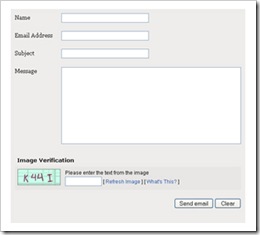 now i am wrote about Contact Us in this blog, there are many e-mails that ask on how to make a contact form like this blog’s contact form. Hmmm..do I still remember it? I think I forget because I didn’t write the steps when I was making it. Well, readers, just a minute and let me remember it ok
Before adding the contact form in your blog, it is better for you to consider the good things and bad things of adding the contact form. One of the good things of adding contact form is to ease the visitors to send you e-mails. And the bad things about it are people or your visitors are easy to send you e-mails. The consequence is that you have to be ready to receive a lot of e-mails in your inbox and spare your time to answer their e-mails, right? In this opportunity, Kang Rohman also would like to say sorry if Kang Rohman haven’t been able to respond your emails because Kang Rohman don’t have much time to respond all emails in Kang Rohman inbox.
Read more Here
Making a contact form For website(Blogger,Wordpress)
 now i am wrote about Contact Us in this blog, there are many e-mails that ask on how to make a contact form like this blog’s contact form. Hmmm..do I still remember it? I think I forget because I didn’t write the steps when I was making it. Well, readers, just a minute and let me remember it ok
Before adding the contact form in your blog, it is better for you to consider the good things and bad things of adding the contact form. One of the good things of adding contact form is to ease the visitors to send you e-mails. And the bad things about it are people or your visitors are easy to send you e-mails. The consequence is that you have to be ready to receive a lot of e-mails in your inbox and spare your time to answer their e-mails, right? In this opportunity, Kang Rohman also would like to say sorry if Kang Rohman haven’t been able to respond your emails because Kang Rohman don’t have much time to respond all emails in Kang Rohman inbox.
Where can we gat Contact Form? In the Internet, there are many websites that give this facilities. Some websites give free facilities but some give free facilities. And as a future fortune teller, Kang Rohman knows that you want the free one, don’t you?
The free contact form can be found in
http://www.emailmeform.com
http://kontactr.com
And below are the steps to make the contact form:
To make a contact form, you only need to make a new post as usual, change from compose menu into HTML menu, then paste the code of EmailMeForm you save in notepad or other text editors and finally click publish. That’s it. Now, you have Contact Form in your blog.
Good luck, my readers! Please Comment Us if you Like so.
The free contact form can be found in
http://www.emailmeform.com
http://kontactr.com
http://www.zoho.com
and many others. The contact form of this blog is taken from http://www.emailmeform.com, so I will give the tutorial about the contact from this web. And below are the steps to make the contact form:
- Please, visit http://www.emailmeform.com.
- Drop your eyes to the right side of the monitor
- Click Sign up for free
- Fill the form available with your personal data: First Name : » fill with your first name, example : jaka.
Last Name : » fill with your last name, example : Aditya
Username : » fill with your user name. example : aditya
Password : » fill with your username, example : juralitjungkel.
Retype Password : » fill with your username again, example: juralitjungkel.
Your Email : » fill with your email, example: aditya@unp.im
- Click Sign up.
- Website will thank for using their facilities and ask you to check your e-mail you use when signing up for e-mail verification.
- Open your e-mail from EmailMeForm. The email shows your new account information.
- Click the link given or copy the URL to the address bar browser internet to verify that it is your email.
- After the verification process, click the writing click here to go to your control panel account.
- Drop your attention to the right side of the monitor and click Create new form.
- Here, you should fill in some forms
Web form Name : » fill with your name, or ignore it (it is already Contact Webmaster).
Recipients Emails : » fill with the e-mail which will receive the messages.
Spam Email address : » fill with the e-mail which will receive spam e-mail (junk, ads e-mails or others) or just let it blank if you don’t want to receive spam e-mails.
Thank you page : » fill with URL address that will contain “Thank You”, example; click this post to see the sample or just write your blog URL if you are confused.
Number of fields : » don’t change, just keep it 4.
- Click next on the right of the web
- You should change some filed names as you want, such as; your name becomes Nama, your e-mail address becomes alamat e-mail, etc. Or you can keep them original.
- Click next on the right of the web
- Click next again
- Please fill with your interest ( wow..it is tiring to explain this one) or skip it.
- Click next again
- Click next again
- The web will show the sample of contact form that you have made.
- Click finish
- Click Get the HTML codes
- Copy the code in text area, under the writing Copy and paste this HTML code into your page. The paste them into notepad or other text editors.
- finish
To make a contact form, you only need to make a new post as usual, change from compose menu into HTML menu, then paste the code of EmailMeForm you save in notepad or other text editors and finally click publish. That’s it. Now, you have Contact Form in your blog.
Good luck, my readers! Please Comment Us if you Like so.
Subscribe to:
Posts (Atom)


